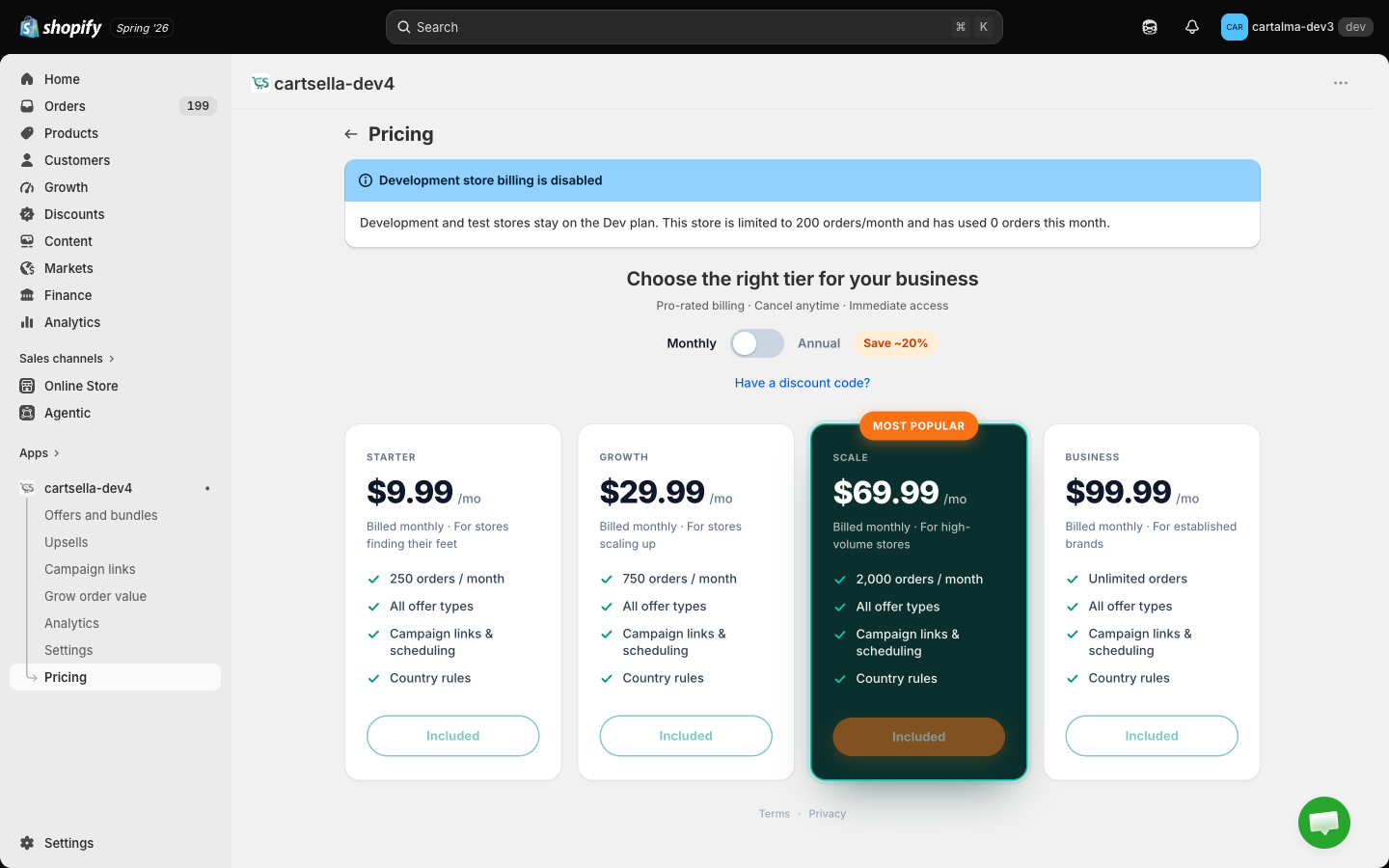
The plans
Annual billing saves 20% against paying monthly. The plan cards always show the per month figure, so an annual Growth card reads 287.99 is what Shopify charges once a year.
The Dev plan is assigned automatically to Shopify development and test stores. It is not something you can choose. Development stores cannot create Shopify billing charges, so they cannot change plans at all.
Included on every plan
- All offer types: gift with purchase, shipping discounts, delivery rules, volume discounts, quantity breaks, cheapest item discounts, automatic product discounts, standard bundles, pick your bundle, the bundle builder, and the pack selector.
- All six upsell types.
- All storefront blocks.
- Scheduling, with start and end dates.
- Country and market rules.
- Campaign links.
- Analytics.
What needs Shopify Plus, not a higher plan
Two things are gated by Shopify’s own platform rather than by your CartSella plan:- Checkout upsells require Shopify Plus.
- Hiding shipping methods at checkout with a delivery rule requires Shopify Plus.
Free trial
Paid plans come with a 7-day free trial if your store has never had a CartSella subscription. When you are eligible, every paid plan card lists “7-day free trial” among its features and the button reads Start 7-day trial instead of Upgrade. The trial is one time per store. Once your store has subscribed even once, switching between paid plans never restarts it. Development stores are never trial eligible, because they cannot be charged in the first place.Order limits
What counts as an order
Your monthly count is the number of orders CartSella was involved in. An order counts when a CartSella offer, upsell or campaign link was attributed to it, which is exactly the same set of orders you see on the Analytics page. Orders that never touched CartSella do not count toward the limit.The window
- Paid plans meter per 30-day billing cycle, aligned with your Shopify subscription renewal.
- Free and Dev plans meter per calendar month, in UTC.

What happens when you hit the limit
When the store is blocked:- Every CartSella theme block stops rendering. Offers, bundles, upsells, progress bars, timers, announcement bars and promo blocks all disappear from the storefront.
- The discounts CartSella created are removed, so nothing is discounted that CartSella promised.
- The CartSella navigation collapses to Pricing only, every other CartSella page redirects there, and a notice covers the page until you dismiss it.
- Your configuration is untouched. Nothing is deleted, nothing is set back to draft.
Getting unblocked
Two ways, and both restore everything on their own:- Upgrade to a plan with a higher limit. CartSella rebuilds the discounts and the storefront blocks start rendering again within a few minutes. You do not need to re-save your offers.
- Wait for the window to reset. Usage drops back below the limit at the start of the next billing cycle or calendar month.
Active item caps
Each plan caps how many offers, upsells and campaign links can be live at the same time. The badge on the Offers and Upsells pages reads “X / Y active on your plan”. An item counts toward the cap only when it is live right now. It does not count if it is:- a draft,
- paused or inactive,
- archived,
- paused automatically, because the gift went out of stock or a usage limit was reached,
- past its end date, even if the status still reads active.
There is also a hard ceiling of 100 offers, 100 upsells and 100 campaign links per store across all statuses, drafts and archives included. It exists to stop a store’s configuration growing without bound. If you reach it, delete records you no longer need. Upgrading does not raise it.
Changing plans
1
Open Pricing
Click Pricing in the CartSella navigation.
2
Pick monthly or annual
Use the toggle above the plan cards. Annual is 20% cheaper per month.
3
Choose a plan
Click the button on the card you want. It reads Start 7-day trial, Upgrade, or Downgrade next cycle depending on your situation.
4
Approve the charge in Shopify
CartSella hands you to Shopify’s approval screen. The charge appears on your regular Shopify bill.
Discount codes
If you have a CartSella discount code, click Have a discount code? below the billing toggle, enter it in the Redeem discount code window and click Apply code. Each code is single use and carries its own terms: the percentage off, whether it applies to monthly billing, annual billing or both, and how many billing cycles it lasts. Once a code is applied, the plan cards show the discounted price and the badge next to the billing toggle switches from “Save ~20%” to your code’s percentage. The link disappears once a code is active, because only one applies at a time.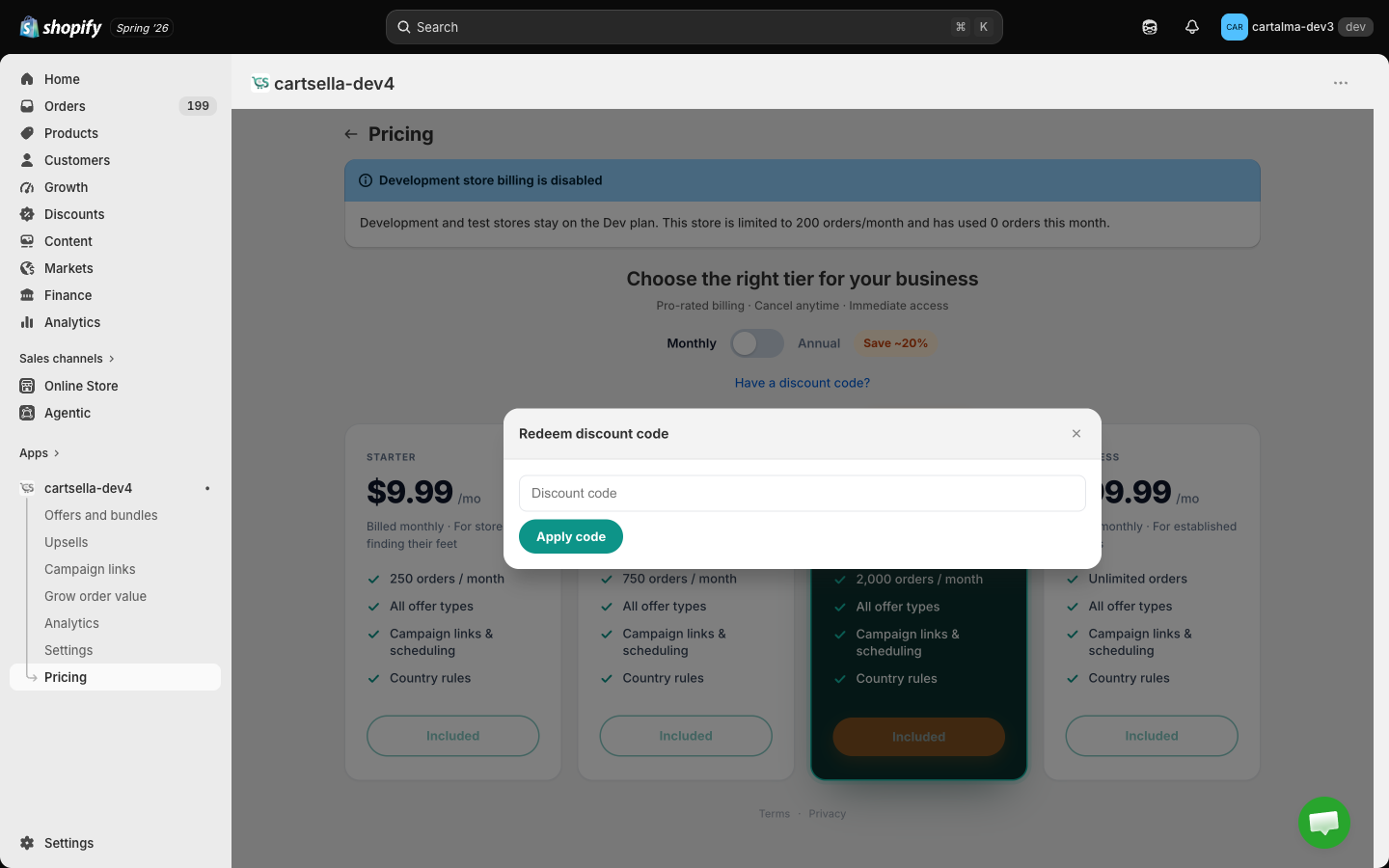
How billing works
CartSella uses Shopify’s built-in app billing. You approve the charge in Shopify, Shopify bills you alongside your Shopify subscription, and Shopify pays us. CartSella never sees or stores your payment details. Billing is pro-rated and you can cancel at any time.Cancelling
Uninstall CartSella from your Shopify admin under Settings → Apps and sales channels. Uninstalling ends the Shopify charge. See Pausing and uninstalling for what happens to your discounts and your data.Common questions
Do I lose my offers if I downgrade?
Do I lose my offers if I downgrade?
No. Everything stays saved. If the new plan has a lower active item cap, you may need to pause some items before you can activate others.
Does an order with no CartSella offer count toward my limit?
Does an order with no CartSella offer count toward my limit?
No. Only orders CartSella was attributed to are counted.
Is the Free plan really free?
Is the Free plan really free?
Yes, indefinitely, within its 50 orders per month and its 3 offers, 3 upsells and 1 campaign link caps.
Can I get annual billing?
Can I get annual billing?
Yes, on Starter, Growth, Scale and Business. Switch the toggle above the plan cards. Annual saves 20%.
Why can I only see paid plans on the Pricing page?
Why can I only see paid plans on the Pricing page?
Because those are the ones you can move to. The Free plan card is shown as well while you are on Free, so you can see what you already have.