Requirements
On a vintage (pre 2.0) theme the app embed still loads, and cart-driven offers such as gift with purchase and free shipping still work. The blocks you drag into a page, such as the offers block and the bundles block, need a 2.0 theme.
1. Add the app
1
Open the listing
Find CartSella in the Shopify App Store and click Add app.
2
Approve the permissions
Shopify shows what CartSella can access. Approve to continue.
3
Land on the setup screen
You arrive at the CartSella welcome screen inside your Shopify admin, with three setup steps waiting.
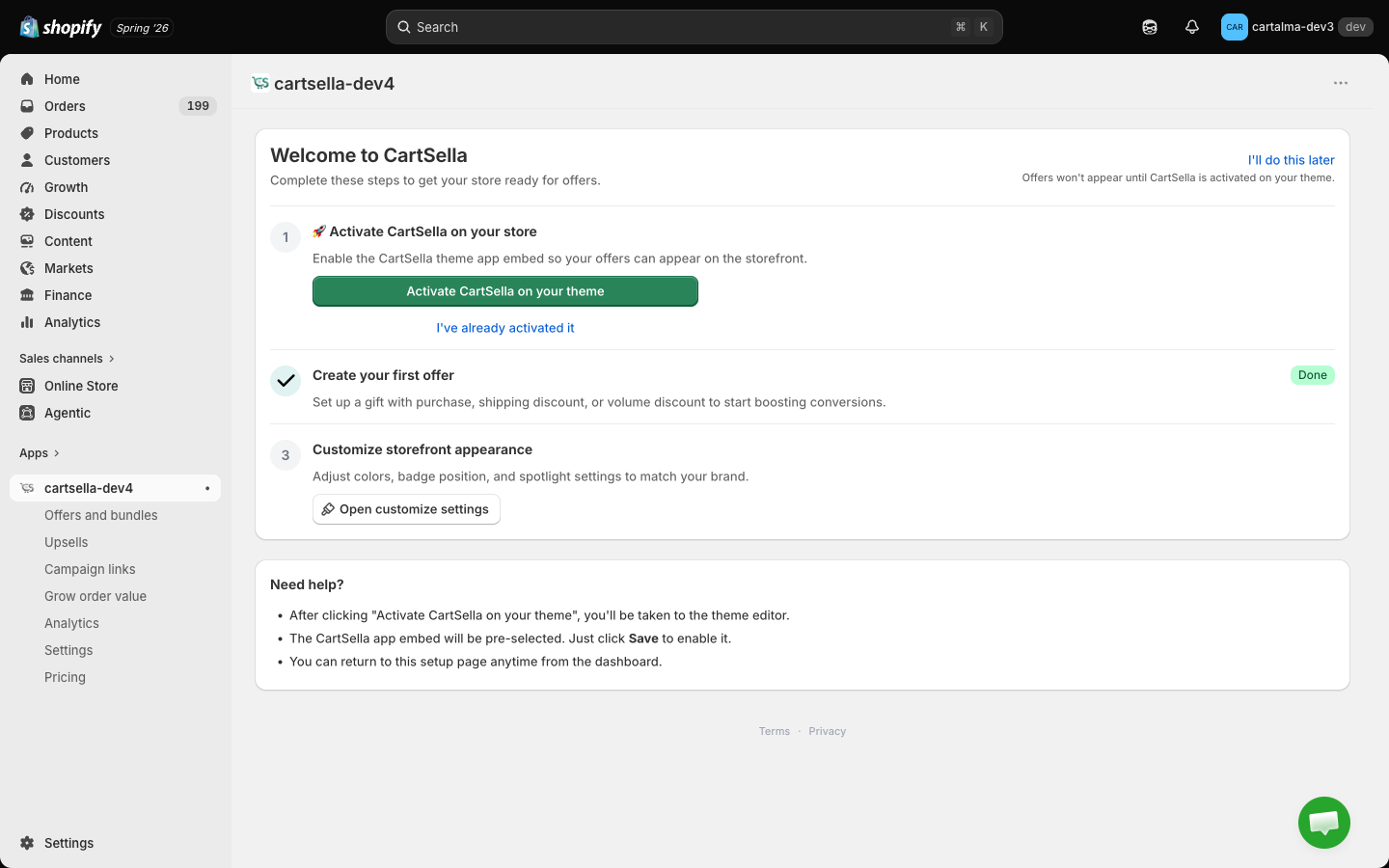
2. Switch on the app embed
The app embed is the CartSella runtime. It loads on every page of your store, and it is what adds gift lines to the cart, applies shipping discounts, keeps the progress bar in sync and powers every block you place.The one-click route
1
Click Activate CartSella on your theme
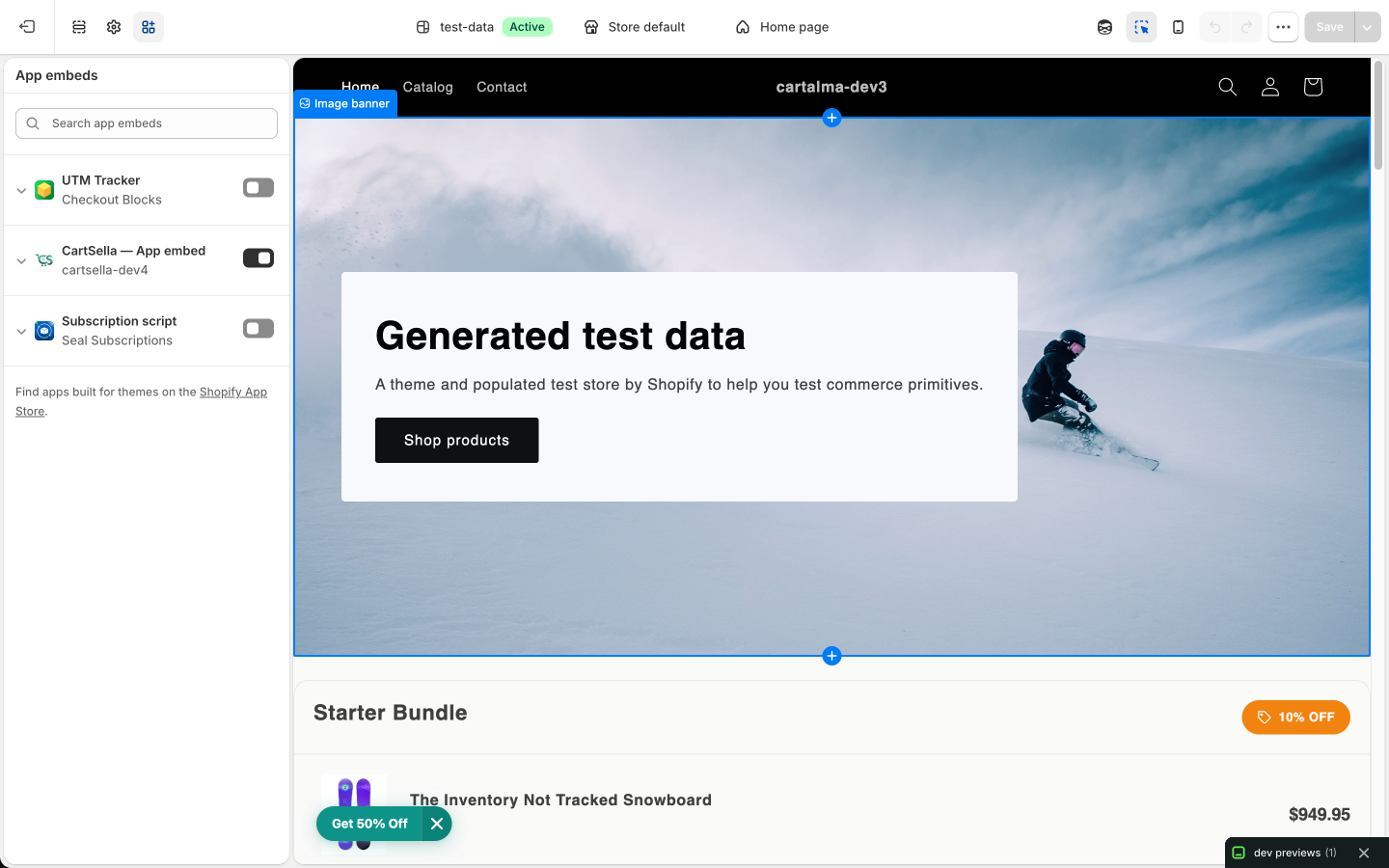
On the setup screen, click the green Activate CartSella on your theme button. It opens your theme editor in a new tab with the CartSella app embed already selected and switched on.
2
Save in the theme editor
Click Save at the top right. Nothing is applied until you save.
3
Come back to CartSella
Switch back to the CartSella tab. It re-checks your published theme automatically when the tab regains focus, and marks the step done once it sees the embed live.
By hand
1
Open your live theme
In your Shopify admin go to Online Store, then Themes, then Customize on your live theme.
2
Open App embeds
Click the gear icon near the bottom of the left sidebar to open theme settings, then open App embeds.
3
Toggle CartSella on
Find CartSella — App embed in the list and switch it on.
4
Save
Click Save.
3. When CartSella asks you again
CartSella re-reads your published theme every time you open the app. If the embed is not there, a popup takes over the screen and asks you to activate it, with the same one-click button. It reappears until the embed is genuinely live. This is deliberate. An app with the embed off is an app that silently does nothing, so CartSella would rather interrupt you once than let you build offers no shopper will ever see. If you switch themes later, or a theme update removes the embed, the popup comes back. Switch it on again in the new theme and it goes away.4. Check it worked
1
Create something to test with
You need at least one active offer before there is anything to see. Getting started builds one end to end.
2
Open your storefront in a private window
A fresh session avoids a stale cart and cached theme assets confusing the result.
3
Build a qualifying cart
A gift with purchase adds its gift line to the cart on its own. A shipping discount shows on the checkout shipping step. Anything the shopper reads on a page, such as a bundle or a discount table, needs its block placed first, see Theme blocks.
5. Your plan
CartSella starts on the Free plan. It includes every offer type, 50 orders per month, 3 offers and 3 upsells active at once, and 1 campaign link. Paid plans raise the monthly order allowance and the number of things you can keep switched on at once. Stores that have never subscribed get a 7-day free trial when they first move to a paid plan. See Plans and billing for the full table and for exactly what counts as an order.Development stores are put on the Dev plan automatically. It is free, cannot be changed, and cannot be billed.
Uninstalling
Remove CartSella from Settings, then Apps and sales channels in your Shopify admin. Uninstalling stops the discounts and removes the storefront widgets. You can leave the app embed switched on in your theme, it renders nothing once the app is gone. See Pause or uninstall for the tidier options first.Next
Build your first offer
A gift with purchase, end to end.
Theme blocks
Decide which block goes on which page.